September 25, 2026 · 9 min read
From Answers to Actions: Using Tools in Microsoft Foundry
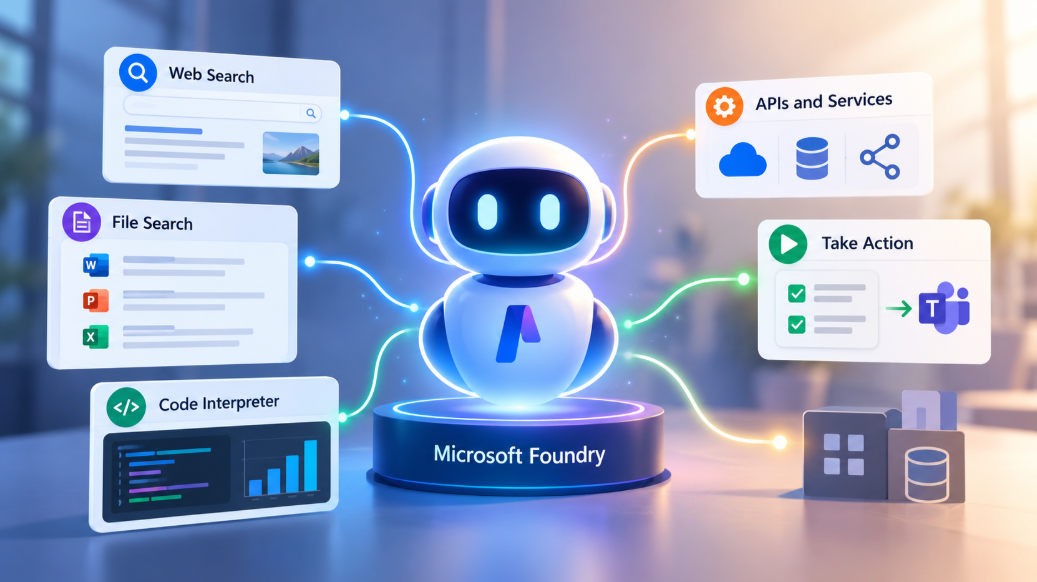
Generative AI initially impressed people because it could talk.
The more important evolution is that it can now interact with the world around it and take action.
It can search for something that happened this morning. It can look through a document you uploaded. It can run a calculation. It can connect to an API. It can trigger a workflow.
And, with the right permissions and guardrails, it can take an action in another system on your behalf.
That changes the conversation quite a bit.
The interesting question is no longer just:
"What can the model answer?"
It is increasingly:
"What can the model reach, use and do?"
That is where tools come in.
And once the idea clicks, tools are actually much simpler than they first sound.
Microsoft Foundry gives us a practical place to see that happen.
The Model Is Intelligent, but It Is Still Limited
A language model can explain, summarise, compare, reason and generate.
But there is a boundary around what it can access by itself.
Suppose I ask:
What is the latest Microsoft Foundry announcement today?
That requires current information.
Again, suppose I ask:
According to our internal travel policy, what is the maximum taxi reimbursement?
That information may exist only inside a private company document.
Or I ask:
What is the current status of customer order 54821?
That may require access to a live business system.
The model may understand all three questions perfectly.
What it lacks is access.
That is a useful way to think about the model's knowledge boundary.
The problem is not always intelligence.
Sometimes the model simply cannot reach the information or system it needs.
Tools help close that gap.
So, What Is a Tool?
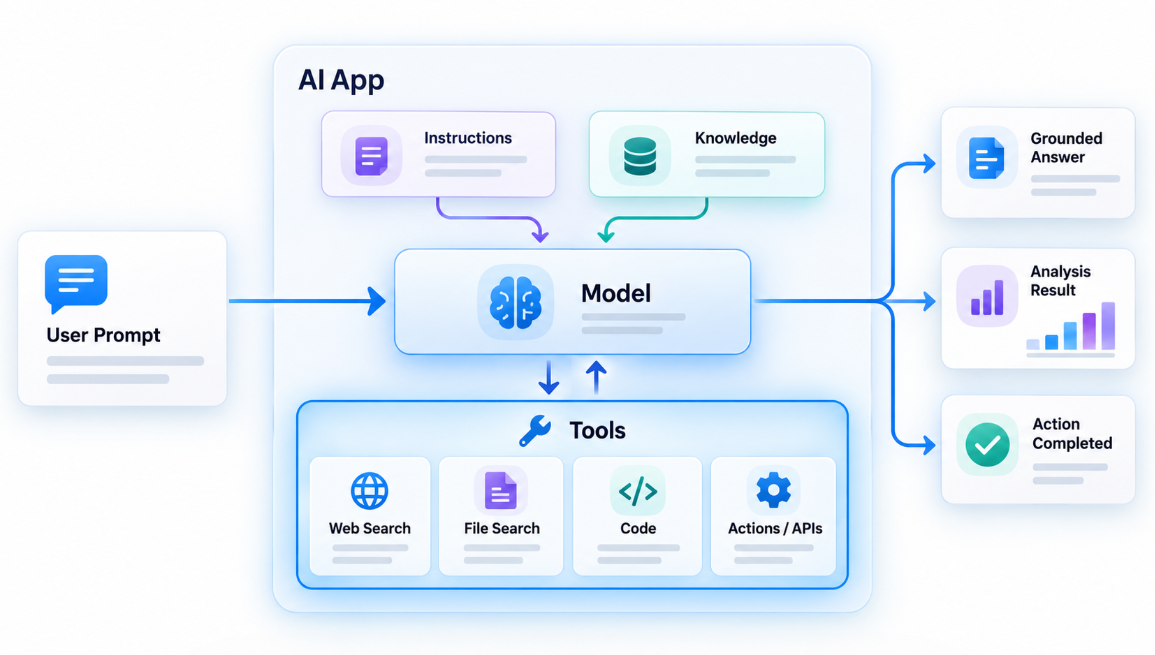
A tool is simply an additional capability made available to a model or agent.
That capability might allow it to search for information, retrieve something from your own data, perform a calculation, connect to another service or take an action.
Microsoft describes tools in Foundry Agent Service in much the same way: they extend what an agent can do by retrieving information, calling APIs and connecting to external services.
In Microsoft Foundry, examples include tools such as Web Search, File Search and Code Interpreter, as well as custom tools that connect the agent to APIs, workflows and other systems.
We will look at some of those shortly.
For now, the simplest way I think about it is:
- The model provides the intelligence.
- The tool provides the capability.
So if I give the model Web Search, I have not suddenly made it more intelligent.
I have given it somewhere to look.
If I give it File Search, I have not trained it on my company's policies.
I have given it access to the documents where those policies live.
And if I give it Code Interpreter, I have given it an environment where it can run calculations and analyse data.
The model still does the reasoning.
The tools extend what it can actually reach and do.
And this is part of why tools matter so much when we start talking about agents:
Tools are one of the things that make AI systems agentic: they give the model a way to act, not just answer.
Tools alone do not make a system agentic, of course.
But they are an important part of the picture because they allow the model to move beyond its own reasoning and interact with something outside itself.
Built-In Tools Make This Easy to See
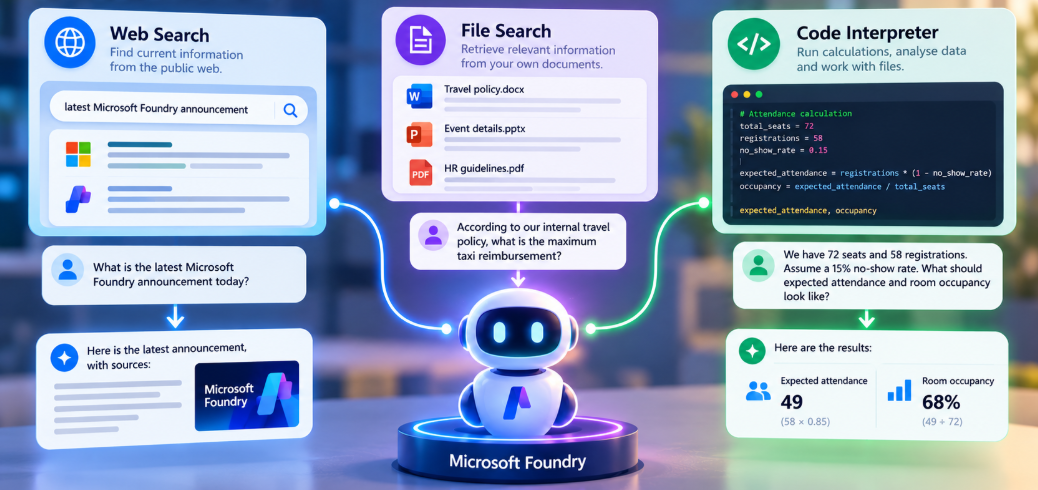
Some capabilities are already provided for us.
Take Web Search, for example.
A model may have strong general knowledge, but that does not mean it automatically knows what happened today.
Web grounding in Foundry can connect an agent to current public web information, allowing it to search when it needs something beyond the model's existing knowledge and return source-backed answers.
Now take File Search.
You can give an agent access to your documents and allow it to retrieve relevant information when answering a question. Foundry's File Search is designed specifically to ground agents in user-provided or proprietary information.
Imagine I upload a small event document containing:
Travel reimbursement cap: £38.
Slides must be sent by 12 noon on 5 September.
Event reference: NEAZ-FDRY-926.
Then I ask:
What is the reimbursement cap, the deadline and the event reference?
The model did not learn those details during training.
It retrieved them from the information I made available to it.
Now take Code Interpreter.
Suppose I ask:
We have 72 seats and 58 registrations. Assume a 15% no-show rate. What should expected attendance and room occupancy look like?
Code Interpreter gives the agent a sandboxed Python environment where it can generate and execute code for calculations, data analysis and similar tasks.
And that introduces an important part of tool use.
I do not necessarily have to tell the agent:
Use Code Interpreter now.
If the tool is available and appropriately described, the model can determine that it is useful for the task.
Custom Tools Are Where Things Become Business-Specific
Built-in tools can take us quite far.
But sooner or later, most organisations reach the same point.
There is something the AI needs to do that is specific to their environment.
Maybe it needs to check an order.
Raise a support ticket.
Look up inventory.
Query an internal service.
Send something for approval.
Or start a business workflow.
That is where custom tools become important.
Imagine an internal support agent.
The user may say:
My VPN has stopped working. Can you raise a ticket for me?
The model understands the request.
But understanding the request does not create the ticket.
The agent needs access to a capability that can perform that action.
That capability could be exposed through an API, Azure Functions, an MCP server, a workflow or a developer-defined function.
The implementation can vary.
The important idea is simpler:
You expose a useful capability to the agent, describe what it does, and the agent can decide when that capability (tool) is relevant.
Functions matter when you need to expose custom functionality, but they are not the definition of tools.
They are simply one way of providing a custom capability.
If an organisation already has an HTTP API, for example, Foundry can connect an agent to external services described using OpenAPI specifications.
Azure Functions can also expose functionality to Foundry agents through approaches such as MCP, queue-based tools, or OpenAPI for suitable HTTP-triggered functions.
The tool is the capability.
How you expose that capability is an architectural decision.
A Simple Demo Makes This Obvious
The easiest way to understand all of this is to watch the same agent gain capabilities one at a time.
For getting started with the new Microsoft Foundry portal, check out this article.
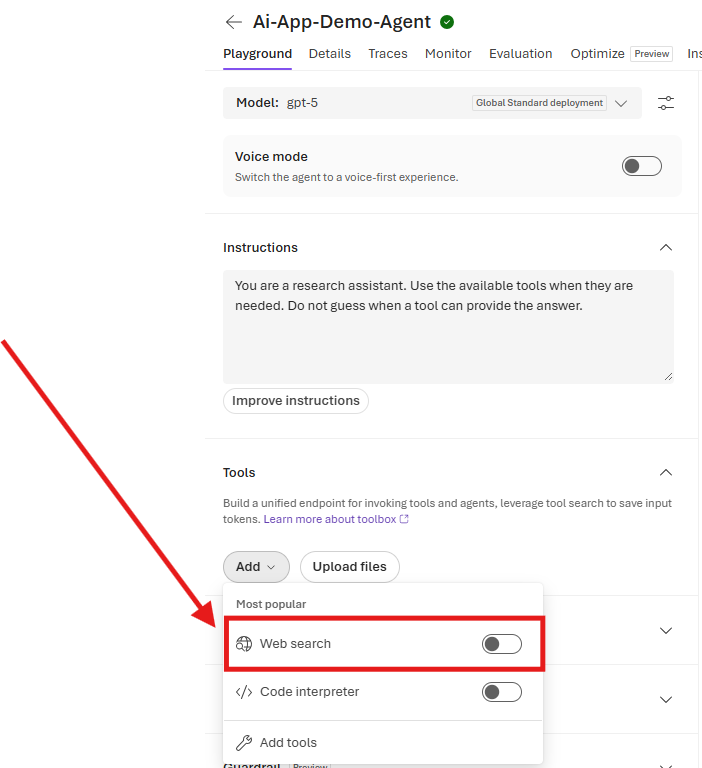
A recent addition to the agent creation setup is Interaction mode. This setting specifies whether your agent processes standard text messages or voice input. For our setup, select Text. Choose carefully in your own builds, as this option cannot be modified after the agent is created.
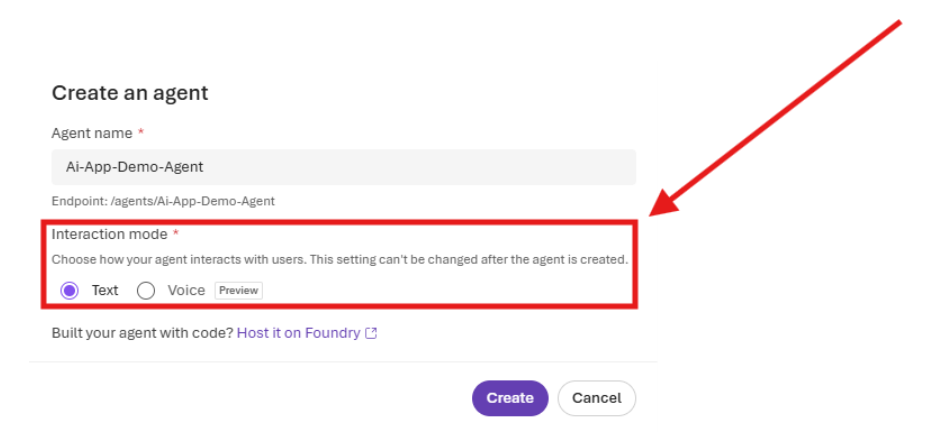
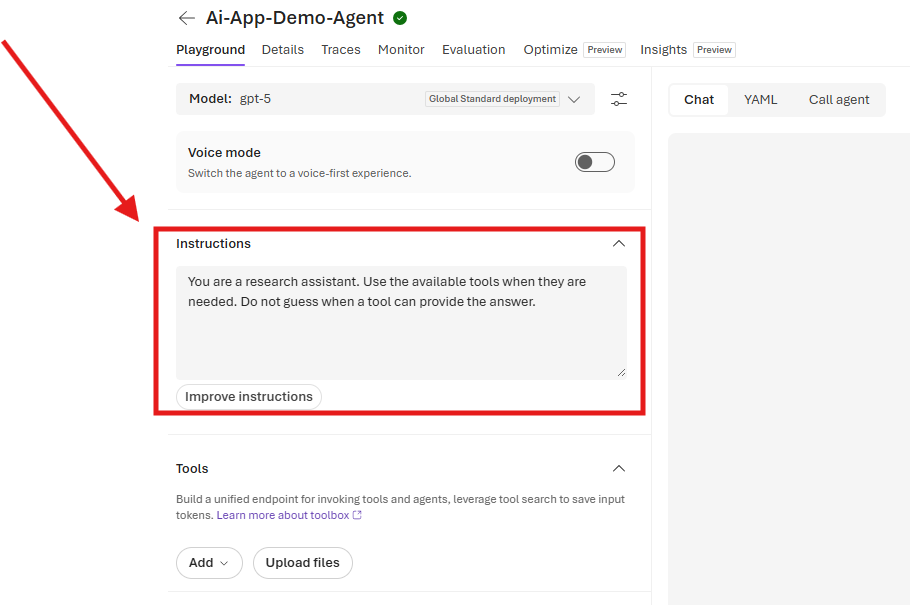
Start with a simple agent in Microsoft Foundry. For this example, go with the default model.
Give it an instruction such as:
You are a research assistant. Use the available tools when they are needed. Do not guess when a tool can provide the answer.
Now ask:
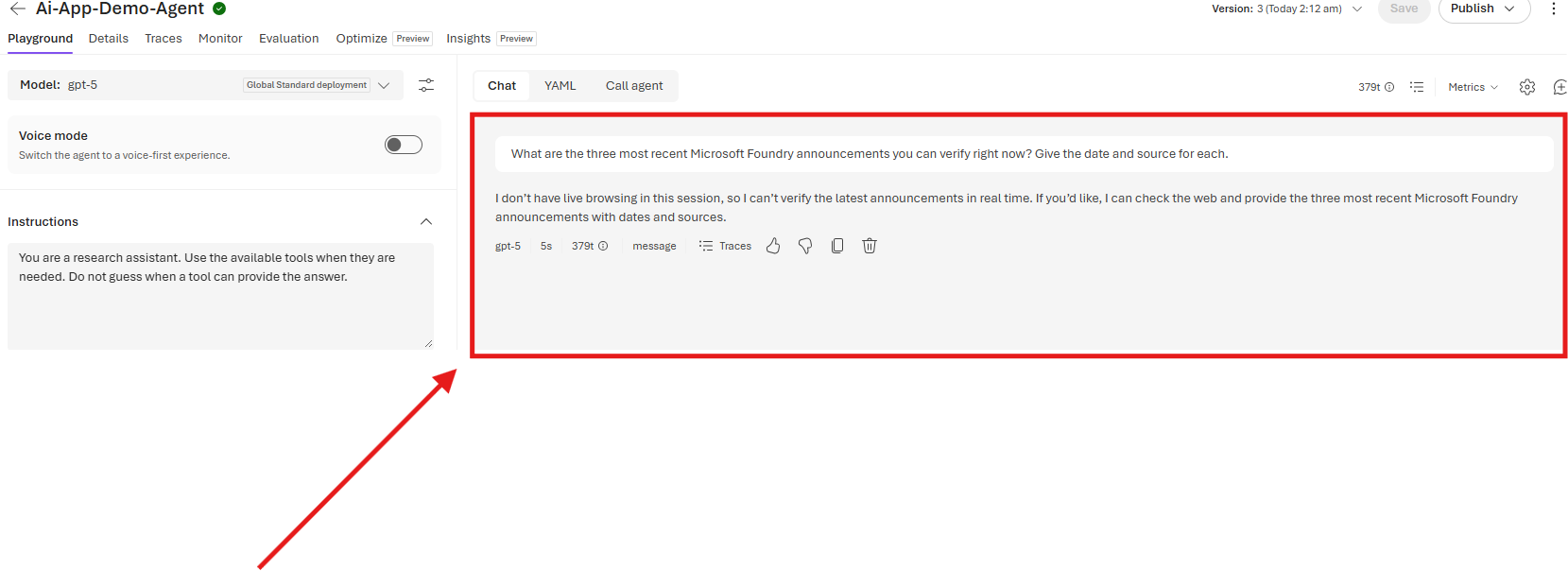
What are the three most recent Microsoft Foundry announcements you can verify right now? Give the date and source for each.
Before you do, make sure none of the tools are toggled on (especially Web Search).
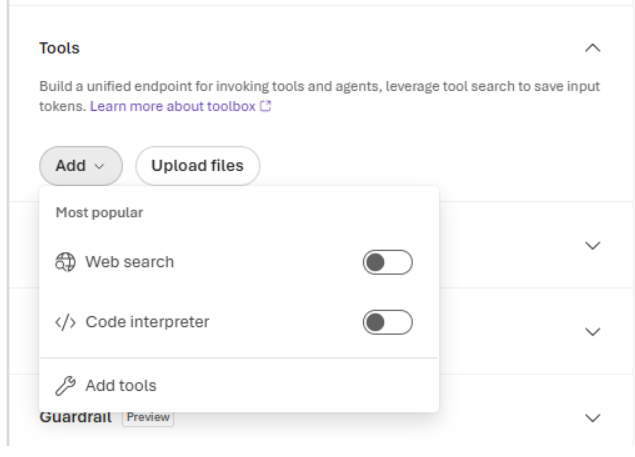
Without live retrieval, there is an obvious limitation.
Even if you remove the instructions and re-run the prompt, the model will run into the same knowledge boundary.
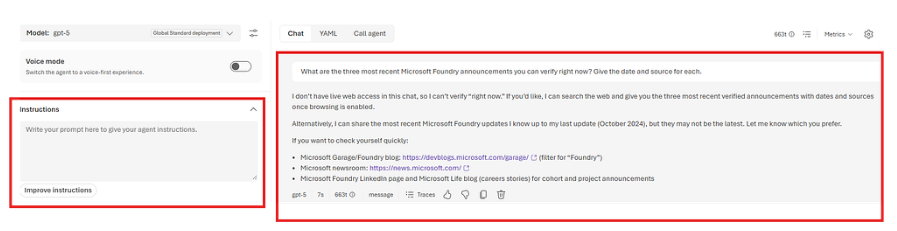
The model can respond from the information already available to it, but we have not given it a way to go out and verify what is current right now.
Now give it access to Web Search and ask again.
Same model.
Same question.
Different capability.
That is the first useful moment.
Next, upload the fictional event document containing the reimbursement cap, deadline and event reference.
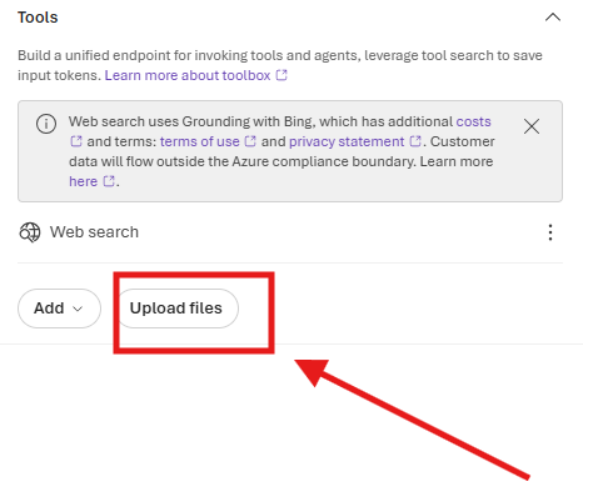
Ask:
According to the uploaded event document, what is the reimbursement cap, the slides deadline and the event reference?
Now the agent is working with information that belongs to us.
Again, the model has not changed.
What it can access has.
Next, add Code Interpreter and ask:
We have 72 seats and 58 registrations. Assume a 15% no-show rate. Calculate expected attendance, empty seats and room occupancy.
Now the agent has another capability.
Note: Depending on the model you use, it may already have some computational ability from its training. However, you should still enable Code Interpreter.
And finally, bring everything together:
Prepare a short organiser briefing. Include one current Microsoft Foundry update, the slides deadline from the uploaded event document, the event reference, and the expected room occupancy for 72 seats, 58 registrations and a 15% no-show rate.
One prompt.
Different needs.
Different tools.
The interesting part is not simply that those tools exist.
It is that the agent can decide which capability belongs to which part of the request.
That is where the experience starts to feel less like a chatbot and more like a useful assistant.
And Tools Can Take Actions Too
Retrieving information is only half of the story.
A tool can also allow an agent to act.
Imagine saying:
Email the organiser a summary of today's session.
The model can understand the request and prepare the content.
But the model itself is not an email system.
It needs access to something capable of performing the send operation.
That external capability becomes a tool.
The same idea could apply to creating a ticket, updating a CRM record, posting a message or starting an approval workflow.
And that changes the experience from:
Here is what you could do.
towards:
I can help you do it.
That is a much bigger shift than it first appears.
Tools Do Not Mean Unlimited Autonomy

Of course, the ability to act also changes the risk.
Searching the web is one thing.
Reading an internal document is another.
Sending an email is another.
Approving a large payment or deleting a customer record is something else entirely.
The more consequential the action, the more important identity, permissions, validation, logging and approval become.
Microsoft's guidance recommends treating tool outputs carefully, applying least privilege and requiring user approval before consequential actions.
A pattern I still like is:
Prepare → Show → Confirm → Execute
Let the agent do the work required to prepare the action.
Let the user see what is about to happen.
Then execute when the boundary makes sense.
That does not make the agent less capable.
It makes the system more deliberate.
The Bigger Shift
It is easy to look at AI tools as just another list of features.
Web Search.
File Search.
Code Interpreter.
APIs.
Workflows.
MCP.
But I think the more useful way to look at them is as a change in what the AI is connected to.
A model on its own can reason about a request.
A model with tools can reach beyond itself.
And an agent can decide when those capabilities are needed.
That is the real progression.
Not from bad chatbot to better chatbot.
From conversation to interaction.
From:
Here is the answer.
towards:
I found the information, checked the document, ran the calculation and prepared the next action.
There will still be plenty of situations where all we want from AI is a good answer.
But increasingly, the interesting applications are the ones where the answer is only part of the job.
The rest is what happens next.
→ The model provides the intelligence.
→ Tools provide the capabilities.
→ The agent brings them together.
And that is where AI starts becoming genuinely useful in the flow of work.