July 29, 2026 · 9 min read
Azure Scales Automatically. Your Governance Does Not
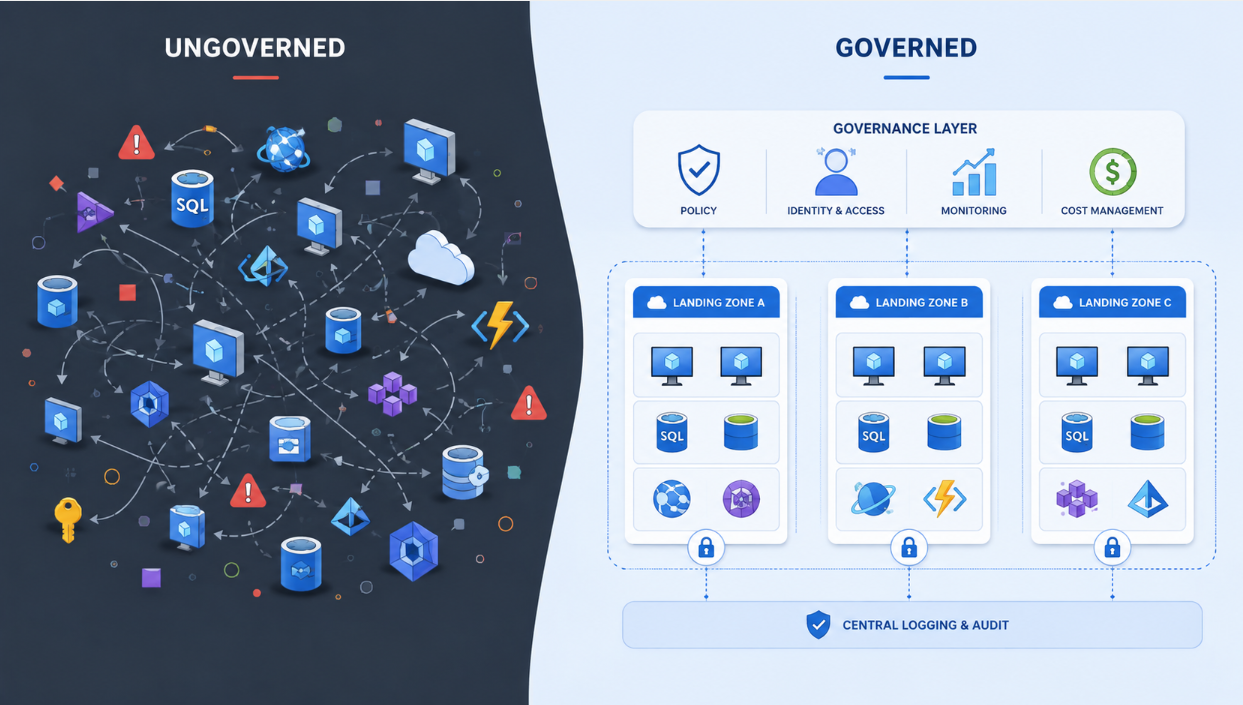
There is a stage in almost every organisation’s Azure journey where things begin to drift.
It rarely starts with a bad decision.
Someone creates a subscription for a proof of concept. The proof of concept works, so it becomes a project. The project reaches production, more engineers are brought in, another team needs access, and a few more resources are deployed to support it.
Before long, the subscription contains a mixture of production and non-production workloads. Owner access has been handed out more generously than anyone intended. Public endpoints are appearing because they are convenient, naming standards are inconsistent, and the monthly bill contains resources that nobody wants to take responsibility for.
Azure has scaled.
The organisation around it has not.
That is usually the point where the conversation changes. You are no longer discussing how to deploy another workload. You are discussing how Azure itself should be organised, governed and operated.
That is the problem an Azure Landing Zone is meant to solve.
An Azure Landing Zone Is More Than a Deployment
An Azure Landing Zone is the foundation from which an organisation runs Azure at scale.
It determines how subscriptions are organised, how access is controlled, how workloads connect, which policies are inherited, where logs are collected and how new environments are introduced.
More importantly, it establishes the boundaries between the teams that operate the Azure platform and the teams that build applications on it.
This is why I do not see a landing zone as a collection of management groups and policies. Those are simply parts of the implementation.
The landing zone is the operating model behind them.
Microsoft’s reference architecture separates the Azure estate into a platform landing zone and multiple application landing zones. The platform provides centrally managed capabilities, while application landing zones give workload teams approved places to deploy and operate their services.
That separation is where the architecture begins to make sense.
Platform Landing Zones and Application Landing Zones
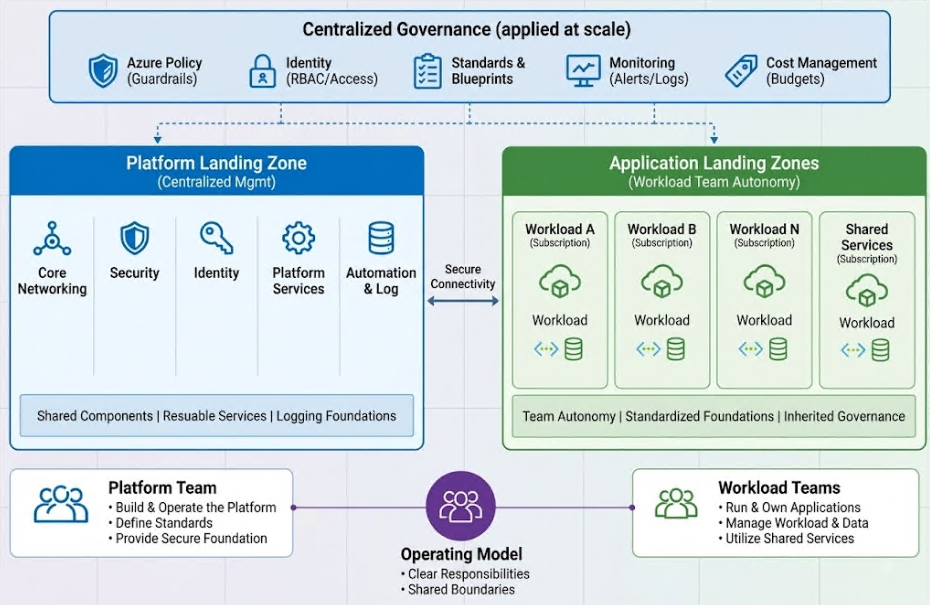
The platform landing zone contains the capabilities that should not be recreated independently by every application team.
This commonly includes:
- Connectivity and hybrid networking
- Central DNS
- Firewalls and routing
- Monitoring and operational tooling
- Security services
- Shared identity components
- Platform automation
The application landing zones are the subscriptions in which individual workloads are deployed.
An application team may receive separate subscriptions for development, testing and production. Those subscriptions still inherit the organisation’s policies, security controls and connectivity patterns, but the application team remains responsible for the workload itself.
This creates a clean division of responsibility.
The platform team owns the road.
The application team owns the vehicle travelling on it.
Problems begin when either side crosses that boundary too often. A platform team that controls every application decision becomes a delivery bottleneck. An application team that can ignore the platform’s guardrails eventually creates security and operational problems for everyone else.
A well-designed landing zone sits between those two extremes.
Start With the Management-Group Structure
A common Azure Landing Zone hierarchy looks broadly like this:
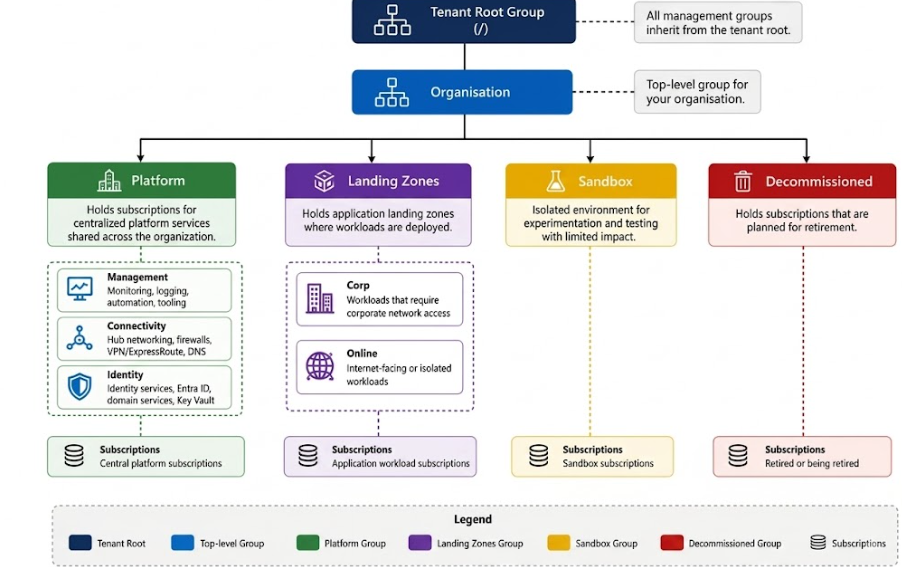
The Platform branch contains subscriptions used for shared services.
The Landing Zones branch contains the subscriptions used by applications and workloads.
Corp typically holds workloads that require access to corporate or on-premises networks. Online is generally used for internet-facing or more isolated workloads that do not require the same corporate connectivity.
Microsoft also includes Local in the reference architecture for workloads associated with Azure Local. Sandbox and Decommissioned management groups provide controlled locations for experimentation and subscription retirement.
The structure is not something to copy blindly.
Management groups should exist because different subscriptions require different policies or operational treatment, not because every department wants its own branch on the diagram.
I have seen management-group hierarchies that closely reproduce the organisation chart. They look tidy until the organisation changes, applications move between business units, or several departments need exactly the same governance controls.
Build the hierarchy around policy and platform requirements. Use subscriptions, resource groups, tags and cost-management structures to represent ownership.
Use Subscriptions as Real Boundaries
Subscriptions are not simply places where Azure sends the bill.
They provide boundaries for access, policy, cost ownership, quotas and operational responsibility.
A growing organisation should resist the temptation to place every application in one large subscription. It may seem easier at first, but access and cost attribution become increasingly difficult as more teams arrive.
A workload might instead receive:
- sub-payments-dev
- sub-payments-test
- sub-payments-prod
Those subscriptions can all remain under the same management group if they require the same overall policy and connectivity model.
The important point is not to create as many subscriptions as possible. It is to create boundaries that remain understandable as the environment grows.
When an incident occurs, you should be able to answer three questions quickly:
- Who owns this workload?
- Which controls apply to it?
- Who is allowed to change it?
A good subscription model makes those answers obvious.
Networking Should Be Deliberate
Hub-and-spoke remains one of the most common connectivity patterns for enterprise Azure environments.
The hub provides shared connectivity services such as Azure Firewall, ExpressRoute or VPN gateways, Azure Bastion and private DNS. Application workloads are deployed into spoke virtual networks and connected to the hub.
Where central inspection is required, traffic can be routed through an Azure Firewall or another approved network appliance.
However, hub-and-spoke should not become a reflex.
Some organisations are better suited to Azure Virtual WAN. Others have workloads that can remain isolated and do not need a connection to the corporate network at all.
The correct design depends on the number of regions, branch connectivity, traffic patterns, security requirements, cost and the team’s ability to operate the platform. Microsoft recommends choosing the topology according to the organisation’s actual connectivity requirements rather than treating one model as universally correct.
What should not happen is for every project to make its own independent networking decisions.
That is how overlapping address spaces appear. It is how five teams create five different private DNS patterns. It is also how virtual machines end up with public IP addresses because nobody provided a better administration path.
The landing zone should make the secure route the easiest route.
Identity Is Where Governance Becomes Real
An impressive landing-zone diagram means very little if half the engineering team has permanent Owner access.
Access should be assigned through Microsoft Entra groups wherever practical. Built-in Azure roles should be used before creating custom roles, and permissions should be applied at the lowest sensible scope.
Privileged access should be treated differently from everyday access.
Microsoft Entra Privileged Identity Management allows elevated roles to remain eligible rather than permanently active. Administrators activate them when required, for a limited period, under the organisation’s approval and authentication requirements.
This matters even more at management-group scope, where a single role assignment can be inherited by many subscriptions.
The principle is straightforward:
Give people enough access to perform their responsibilities, but do not make exceptional access permanent simply because it is convenient.
Policy Should Create Guardrails, Not Gridlock
Azure Policy is where architectural decisions become enforceable.
It can audit or restrict public access, permitted regions, diagnostic settings, resource types, security configuration and many other standards.
But policy must be introduced with judgement.
Applying a large set of Deny policies to an existing environment may look decisive, but it can block legitimate deployments and create a rush of exemptions before anyone understands the impact.
Start with audit where appropriate.
See what is already non-compliant. Determine which exceptions are genuine. Remediate what can be corrected, test the effect on deployment pipelines, and then move towards enforcement.
Exemptions should not become permanent escape routes. Every exemption needs a reason, an owner and an expiry date.
Good governance should make the safe option obvious and repeatable.
It should not make every deployment feel like a negotiation with the platform team.
Deploy the Platform as Code
You can create management groups, policies and platform resources manually through the Azure portal.
You can also manage firewall rules through screenshots and keep network diagrams in someone’s Downloads folder.
Neither approach scales particularly well.
The platform should be versioned, reviewed and deployed through infrastructure as code.
Microsoft currently recommends its Azure Landing Zones Infrastructure-as-Code Accelerator, using Bicep or Terraform with Azure Verified Modules. The accelerator can establish the continuous-delivery environment through either GitHub or Azure DevOps.
The real benefit is not that Bicep or Terraform is more fashionable than the portal.
The benefit is that changes become visible.
Someone proposes a policy change. Another engineer reviews it. The deployment is tested, approved and released. If the environment drifts from the code, the difference can be investigated.
That is how a platform should be operated.
Do Not Forget Subscription Vending
After building the core platform, you need a repeatable way to give application teams new landing zones.
If every new subscription depends on someone manually creating it, moving it under the correct management group, assigning permissions, applying tags and configuring networking, inconsistency will eventually return.
Subscription vending turns that process into a platform capability.
An application team requests an approved subscription type. The automation creates or onboards the subscription, places it correctly, applies the required configuration and hands it over ready for workload deployment.
The platform team can offer different subscription products — for example, a corporate-connected production subscription, an isolated online subscription or a sandbox environment.
The application team receives Azure quickly, but it does not receive an empty and ungoverned subscription.
That is the difference between self-service and simply giving people unrestricted access.
Microsoft describes subscription vending as the standardised mechanism through which platform teams issue and govern application landing zones at scale.
Do Not Overengineer the First Version
The goal is not to deploy every component shown in the reference architecture on day one.
A company with a handful of workloads does not need the same firewall estate, management hierarchy and operational tooling as a global organisation with hundreds of subscriptions.
Start with the controls that solve real problems:
- Clear subscription ownership.
- A sensible management-group structure.
- Controlled privileged access.
- Intentional networking.
- A small, tested policy baseline.
- Central visibility.
- A repeatable deployment process.
Build for growth, but do not confuse cost and complexity with maturity.
A landing zone should make Azure easier to operate, not give the platform team a more impressive diagram.
Final Thoughts
Azure Landing Zones are often presented as an implementation exercise.
Create the management groups. Assign the policies. Deploy the hub. Configure logging. Move the subscriptions.
Those things matter, but they are not the hardest part.
The harder part is deciding who owns what, where central control should stop, what application teams should be free to do and how the platform will evolve without becoming a bottleneck.
Those are operating-model decisions disguised as technical architecture.
An enterprise landing zone succeeds when teams can deploy faster without the organisation losing control of security, cost and operations.
Azure will continue to make scaling resources easier.
The governance around those resources still has to be designed.